Travel packing list template
A shared, per-person packing list your AI builds and checks at the door.
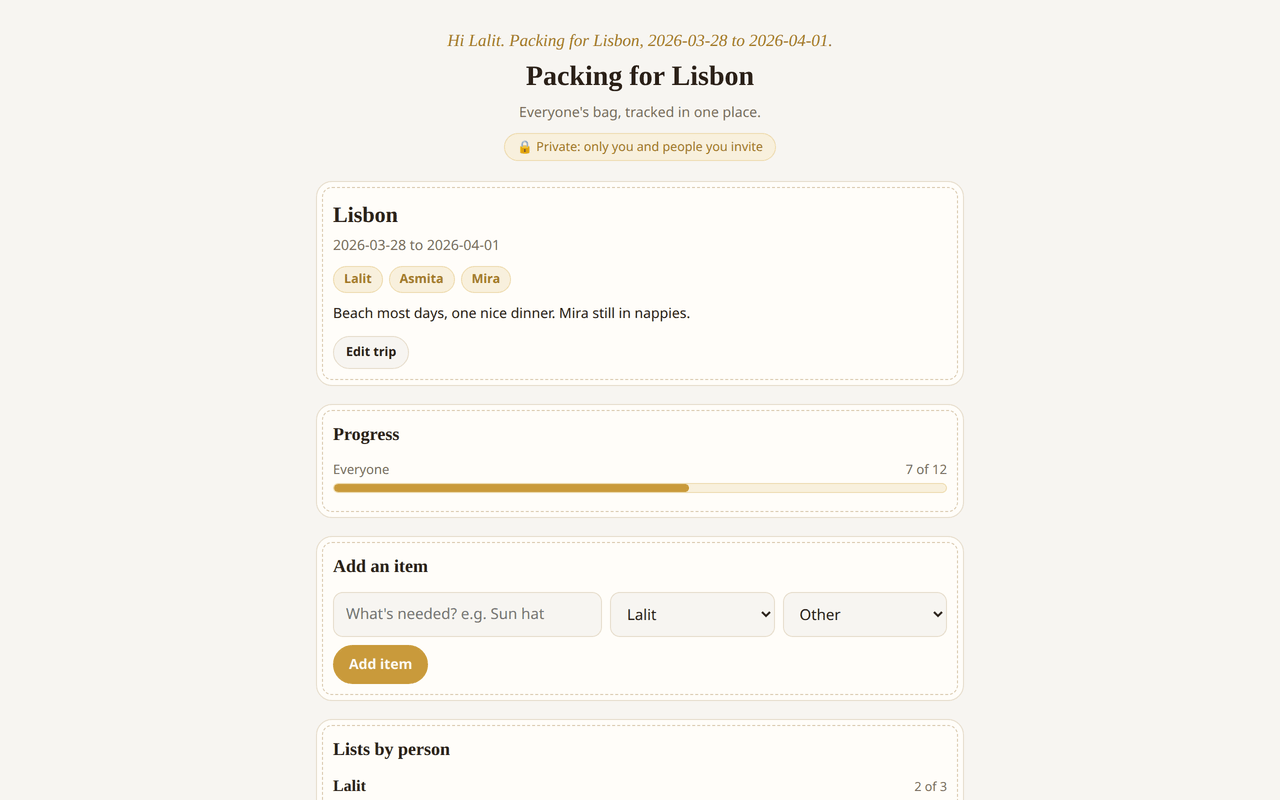
Live preview running the real template. The entries in it are sample data, not a real household's.
What's inside
Data it stores (2 collections)
- 2 collections
tripitemsmembers can read, add and edit
No special permissions: this app runs entirely inside Homespun, with no outside network access.
One list, split by whose bag it goes in
Trip Packing List holds a trip (destination, dates, who is going, notes) and the items to pack for it. Every item belongs to a person or to a shared pile and carries a category of clothes, toiletries, documents, baby, electronics or other, and a progress line across the top counts how much of the whole trip is packed. Items can also be marked essential, a flag that exists for one moment: the sweep at the door, when you want passports and chargers at the top of the list and not the third pair of socks.
Who this is for
Families travelling with a small child, mostly. One adult packing for themselves does not need software. Two adults packing for themselves, a toddler and a shared bag of things nobody has assigned to anyone do, because the failure mode is not forgetting an item, it is two people each assuming the other packed it.
Getting a list without writing one
The intended first step is not typing. Tell your AI where you are going, for how long and who is coming, and it writes the trip and generates the items split per person, with a baby group if there is a baby and with documents and chargers already flagged essential. You then delete the three things you do not need, which is much less work than building a list from nothing. You can install it and type instead, and the trip header is editable in the page, but the generating is the reason this beats a notes app with checkboxes.
What everyone travelling sees
Installing gives you a private copy at its own web address, and the others get in by email invite through a link with no password. Everyone can add items, tick items off and remove ones that do not apply, for their own bag or anyone else's, because packing is one of those jobs where whoever is standing at the wardrobe should be able to tick off the thing they are looking at. Ticks land live, so one person packing in the bedroom and another in the bathroom watch the same progress bar move.
The morning you leave
Ask your AI what is still unpacked and it reads the list, leads with the essential items and gives you the short version. Between trips, ask it to add a person and it adds them to the travellers and generates their items rather than making you retype a list you already own. If your household wants a weight column or grouping by bag, that is a request rather than a feature wait.
What it will not do
It holds one trip at a time, not a travel history: the next trip means editing the header and clearing the items, and there is no archive of previous lists. It knows nothing about your booking, the weather or the airline's baggage rules, so what it generates comes from what you told it. It does not remind you unless you ask your AI to add a scheduled reminder. And it needs a connection, so it is a list you check on the way out of the house, not one you read on the plane.
Questions people ask
- Can it make the packing list for me?
- That is the intended way in. Tell your AI the destination, the dates and who is coming and it writes the trip and generates the items grouped by person, including a baby group when there is a baby, with documents and chargers marked essential.
- Can everyone tick off their own items at the same time?
- Yes. Anyone you invite can add, tick and remove items, and changes appear live on everyone else's screen, so two people packing in different rooms are looking at the same progress.
- Does it keep my lists from previous trips?
- No. It is built around one trip at a time, so the next trip means editing the header and clearing the items. If you want a history of past trips, ask your AI to add that, and adding to the app leaves the current list intact.
- Does it work offline on the plane?
- No. It needs a connection, so treat it as the list you check before you leave the house rather than one you read in the air.