Volunteer sign up sheet with time slots
A volunteer sign up sheet with dated time slots and a headcount on each one.
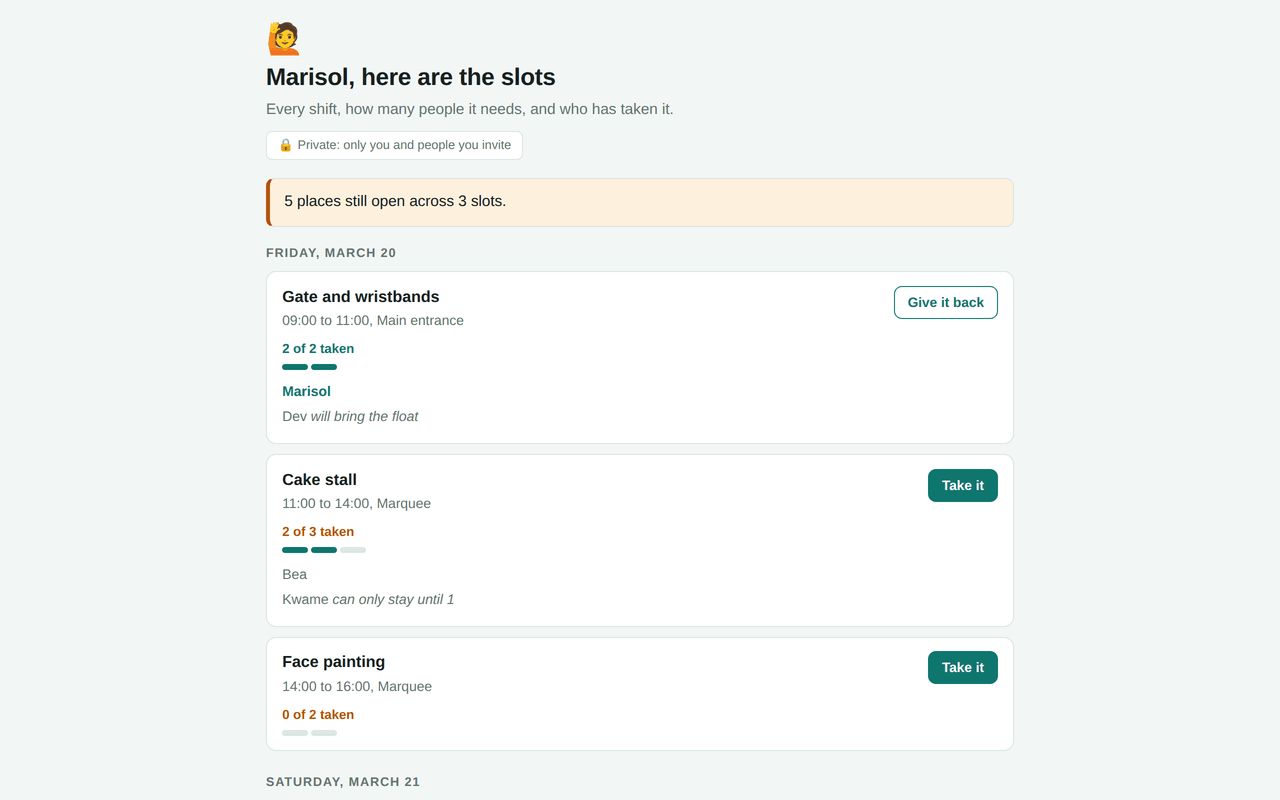
Live preview running the real template. The entries in it are sample data, not a real household's.
What's inside
Data it stores (2 collections)
signupsmembers can read; you, members can add, you, creators can editslotsmembers can read; you can add or edit
No special permissions: this app runs entirely inside Homespun, with no outside network access.
Slots first, then the people who fill them
Volunteer Slots is built the way a rota is actually planned: the shifts exist before the volunteers do. A slot carries what the job is, a date, a start and an end time, a place, and the number of people it wants. Everything else is derived from that number. A slot shows how many of its places are taken, a row of pips shows it at a glance, and a banner across the top adds up every unfilled place, so the organiser has one figure to watch instead of a list to scan.
The kind of day this is built for
School fairs, a charity stall, a village hall clean up, a shelter's weekend cover. The common shape is a fixed day broken into hours, a job that needs a specific headcount at a specific time, and people who will help if asked clearly. The failure it prevents is three volunteers turning up for the busy hour and nobody being there at four.
Laying the day out without typing thirty rows
Building the grid is the dull part, so hand it over. Describe the hours, the jobs and how many people each one needs, and your AI writes every slot in one go. What you get back is a page you correct rather than a form you fill in, which is a much shorter piece of work and far less likely to end with a two hour hole nobody spotted.
After that the sheet is a web address you send round. Everyone helping needs an invitation, which is an email address and a sign-in link, after which the page opens on their phone with no app store in the way.
Taking a slot, and giving one back
Taking a slot is one button, and it writes a row that belongs to you. Giving it back is the same button again. Nobody else can hand back your place: changing or removing a sign-up is restricted to whoever made it, plus the organiser.
A sign-up is also pinned to the slot it was made for. It cannot be quietly moved to a different shift later, which keeps the record of who agreed to what honest. Sign-ups appear as they happen, so two people looking at the last place on the cake stall do not both take it.
What the organiser can ask for
The question an organiser has all week is which slots are still short and by how much. Ask, and your AI reads the shifts against the sign-ups and answers in the order the day happens. Told somebody has dropped out of Saturday morning, it removes their place and says what that leaves uncovered.
It can reshape the day too. Splitting a three hour shift into two, or widening the headcount on the busy hour, is a sentence rather than a rebuild, and adding to an app never disturbs the sign-ups already in it.
The limits worth knowing before you send it round
This is a sheet for a known group, not a public sign-up link. Everyone who takes a slot has to be someone you invited, which is exactly what makes the names on it trustworthy and exactly what makes it the wrong tool for collecting help from a hundred strangers.
There is no waiting list: a full slot is simply full, and somebody has to give a place back before another person can take it. Slots do not repeat, so a weekly rota means writing the weeks out, which is a good job for your AI and a tedious one by hand. And nobody is reminded of anything. No message goes out the night before, so the sheet tells you where you stand and does not nudge.
The part that makes any of this work is that each person arrives as themselves rather than as an anonymous visitor, which is also the thing a published page with a shared data store cannot offer. how a published page stores what people type into it covers what that shared pool can and cannot hold.
Questions people ask
- Can a slot need more than one person?
- Yes, that is the point of the headcount. Each slot carries the number of people it wants, the page shows how many of those places are taken, and the banner totals every place still open across the whole day.
- Can I send a link and let anyone sign themselves up?
- No. Everyone who takes a slot has to be invited first, which is what lets the sheet show real names rather than whatever somebody typed. For collecting help from a large group of strangers this is the wrong shape of tool.
- What happens if two people take the last place at once?
- Sign-ups appear on everybody's page as they are made, so the second person usually sees the slot fill before they tap. If a slot does end up over-subscribed, the organiser or the AI can clear the extra row.
- Can somebody remove my name from a shift?
- Only the organiser, or the AI acting for them. Ordinary volunteers can change and remove their own sign-ups and no others, which is a rule the server enforces rather than a convention people are asked to respect.
- Does it handle a rota that repeats every week?
- Not by itself. A slot is a dated shift, so a recurring rota means the weeks being written out. Asking your AI to lay out the next two months is the sensible way to do that, and it takes one sentence.